The Backup & Restore module in IRCF Workspace enables administrators to create full manual backups of the system database and restore them in case of failure, data corruption, or human error.
This module operates fully within the admin panel and does not rely on external services or third-party tools.
Designed to ensure operational continuity and data integrity, it provides a simple and secure way to protect mission-critical information.

Backup refers to the creation of a secure, downloadable snapshot of your platform’s database at a specific point in time.
Restore is the process of loading this snapshot to recover the system state in the event of accidental deletion, failure, or data corruption.
This functionality ensures your organisation’s operational data remains recoverable and protected from permanent loss.
Data loss can result from system crashes, accidental deletion, corruption, or cyber threats.
By maintaining regular backups, your organisation reduces the risk of permanent data loss and ensures continuity during unexpected events.
This module gives administrators a secure fallback mechanism that allows full data recovery without technical complexity or reliance on external infrastructure.
The Backup & Restore module allows administrators to capture and store full database backups at key moments in time. These backups can be used to restore the entire system if needed — mitigating risks from accidental deletion, failed updates, or internal user errors. This functionality helps protect mission-critical information such as grant data, user accounts, and organisational records.
In case of ransomware or malicious attacks, this module enables administrators to revert to the last safe system state. Because backups are stored internally and securely, your organisation can restore its environment without external assistance. This approach ensures resilience and business continuity during cybersecurity incidents.
The restore process allows full reversion to a previous database backup through a one-step interface in the admin panel. This function supports complete system recovery — it does not offer selective (table-level) restore. Once selected, the chosen backup replaces the entire database, restoring all previous records, settings, and user content.
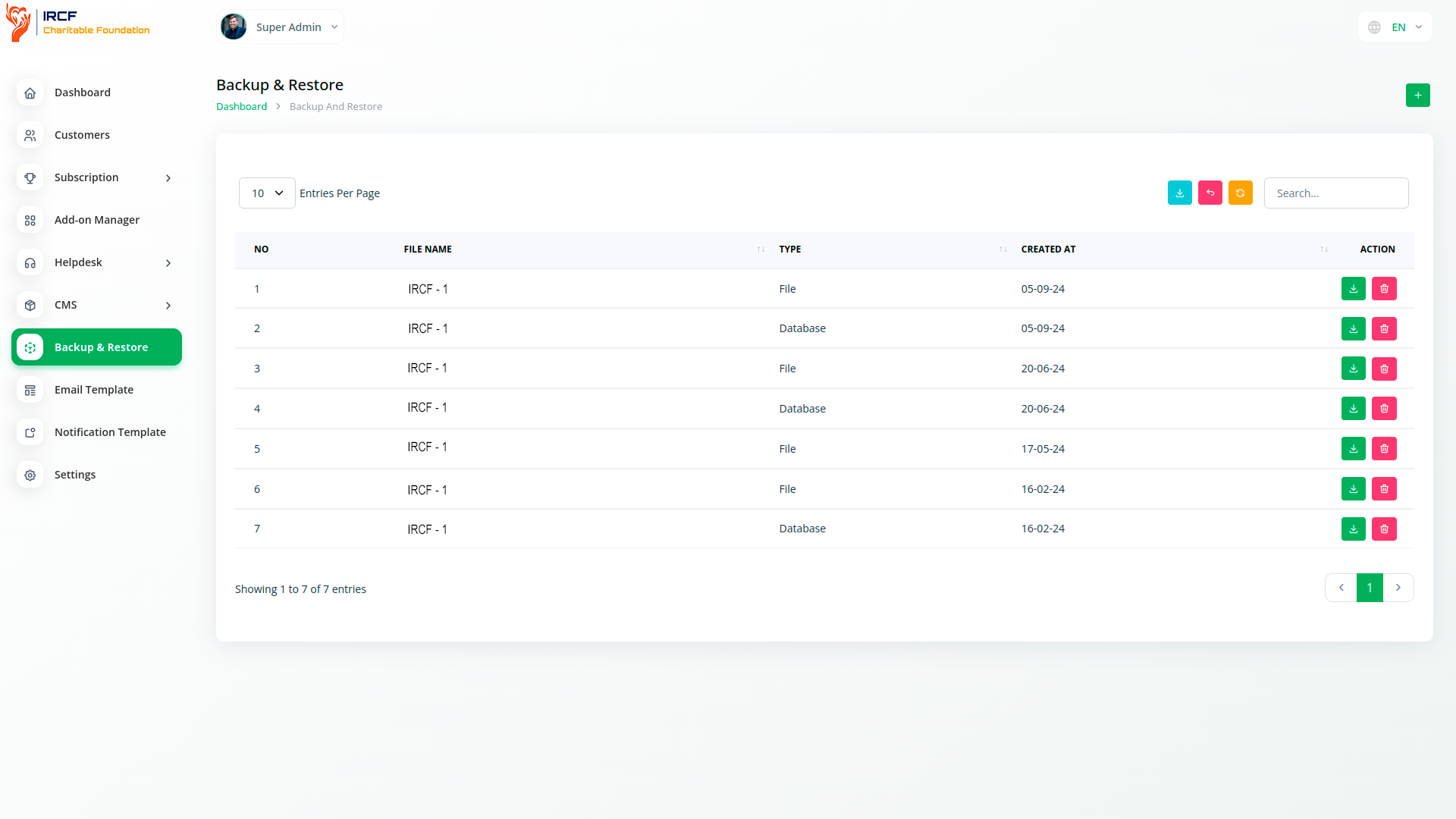
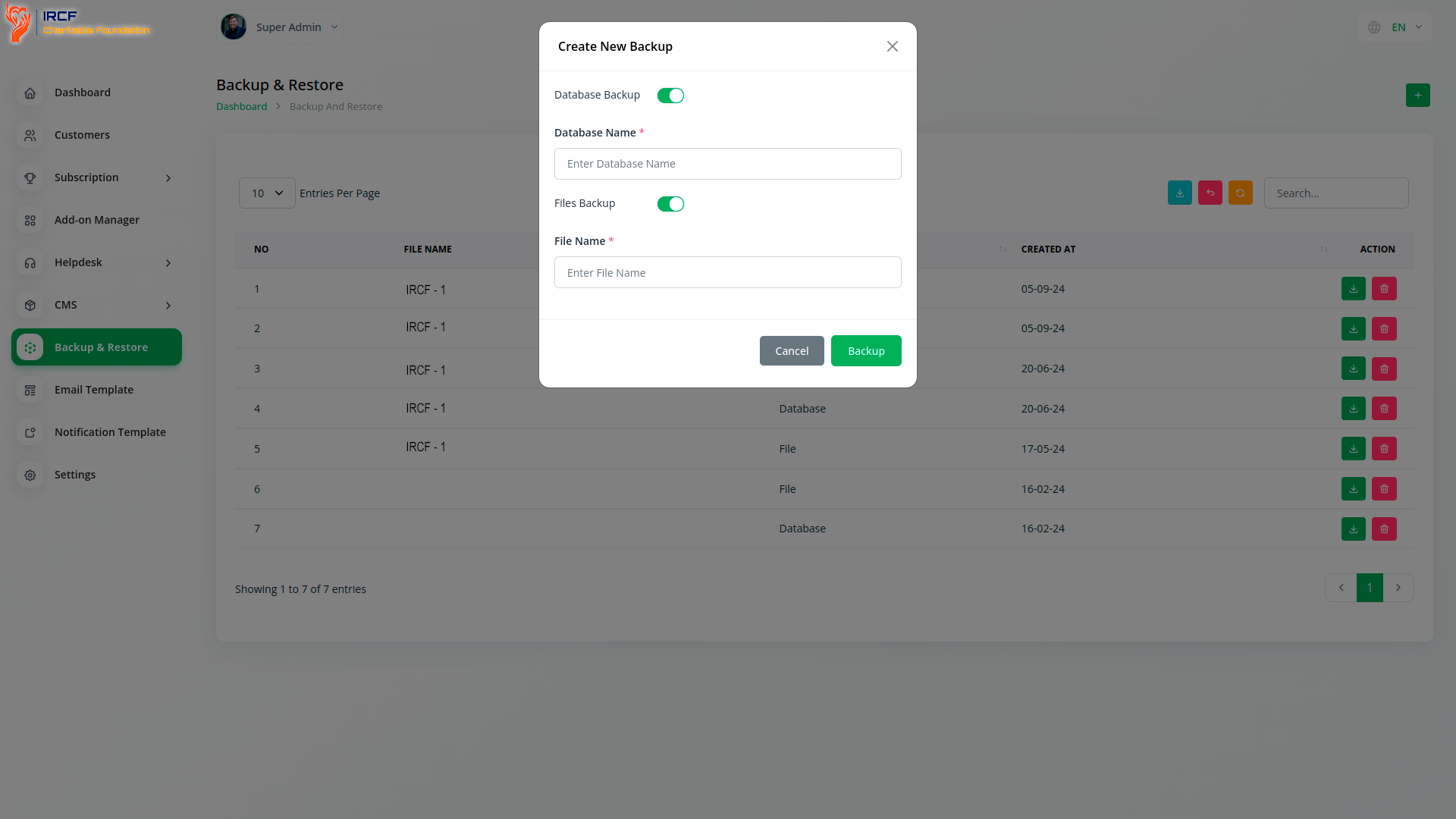
• Manual full database backup via admin panel
• One-click restore for complete recovery
• No third-party tools or integrations required
• Secure internal storage of backup files
• Protection from human error, corruption, or system failure
• Supports operational recovery and continuity
• Simple interface for non-technical administrators
As IT systems grow in complexity, organisations must protect critical data from threats such as cyberattacks, technical failures, and data loss. Backup & Restore ensures your data is secured within the platform and can be recovered quickly if needed — even in worst-case scenarios. Reliable backup and recovery policies are essential for maintaining data integrity and fulfilling operational and legal obligations.
Each backup functions as a complete, restorable system snapshot. In case of failure, the system can be “rewound” to a safe state — preserving all key records and configurations. This approach reduces downtime and prevents data loss during critical moments, ensuring that operations can continue with minimal disruption.
Backup & Restore reduces reliance on external IT support and helps prevent costly disruptions by enabling non-technical administrators to manage backups directly. With secure internal storage, manual control, and instant recovery features, organisations can avoid extended downtime, data loss penalties, and compliance failures — all while reducing the need for complex external recovery tools.
Backup & Restore in IRCF Workspace ensures that your organisation can protect vital data without relying on third-party software or technical complexity.
Built directly into the platform’s admin panel, it enables secure recovery, operational continuity, and data integrity — all managed in-house.
For organisations handling sensitive records, grants, or compliance documents, this module provides an essential foundation for resilience and long-term reliability.
Access a comprehensive suite of premium add-ons for Accounting, Volunteer Management, Donation Processing, Beneficiary Engagement, Communication, Programme Coordination, and more — all in one place!
With IRCF Workspace, you can conveniently manage all your organisation’s functions and charitable activities from a single location.